

Best overall: NinjaOne. Best for support and device management together: Atera. Best for broader endpoint administration: ManageEngine Endpoint Central. For your 2026 shortlist, add ConnectWise Automate for script-driven Windows operations and Microsoft Intune for Microsoft-centered device policy; IT Core provides senior technology leadership and delivery support that strengthens internal IT teams.
- NinjaOne is the best RMM software for IT teams prioritizing monitoring, patching, and remote support.
- Atera fits internal IT teams that want ticketing alongside remote monitoring and management.
- ManageEngine Endpoint Central fits endpoint administration that extends beyond routine RMM work.
- ConnectWise Automate suits script-driven operations; Microsoft Intune suits device policy rather than traditional RMM.
- IT Core supports internal teams with technology leadership, co-managed IT, security, and cloud delivery.
Why this matters
Your monitoring platform should help technicians resolve problems, not simply produce more alerts. The right choice depends on who owns device support, how much automation your team can maintain, and whether you need live troubleshooting or policy enforcement.
Choose the operating model before the software. An internal IT department needs clear ownership, useful escalation, and access controls that match its responsibilities. A feature-rich platform still creates extra work when nobody owns its alerts or failed maintenance jobs.
RMM means remote monitoring and management. It combines device visibility with actions such as patching, scripting, and remote assistance. Endpoint management overlaps with RMM, but a policy-centered platform does not automatically replace a technician's troubleshooting workflow.
What makes the best RMM software for IT teams
Use these criteria to build your 2026 shortlist. Give the greatest weight to work your team performs repeatedly, rather than features that look useful in a demonstration.
- Actionable monitoring: Alerts should identify a condition your team can investigate, assign, and resolve. Check how the platform handles repeated notifications.
- Controlled patching: Your team needs approval rules, maintenance windows, deployment visibility, and a way to investigate failures.
- Remote support: Test the path from an alert or ticket to a working support session. Confirm how technicians receive permission and how access is recorded.
- Useful automation: Scripts and scheduled tasks should remove repeat work without hiding failures or creating unclear ownership.
- Access governance: Evaluate technician roles, authentication, administrative permissions, and logs. Separate routine support from sensitive administration.
- Administrative fit: Match the platform to your device types, existing support process, and capacity to maintain it. Integration requirements belong in the decision, not after it.
RMM software at a glance
| Option | Best for | Standout capability | Key limitation |
|---|---|---|---|
| NinjaOne | Monitoring and remote support | Monitoring, patching, scripting, and remote management in an endpoint platform | Broader service-management needs require separate evaluation |
| Atera | Ticket-led internal support | Ticketing alongside RMM functions | Teams with an established service desk must assess workflow overlap |
| ManageEngine Endpoint Central | Broad endpoint administration | Software deployment, patching, inventory, and configuration management | Its administrative scope extends beyond a focused RMM workflow |
| ConnectWise Automate | Script-driven Windows operations | Monitoring and automation for repeatable administration | Requires ownership of scripts, monitors, and configuration |
| Microsoft Intune | Microsoft-centered device policy | Device configuration, compliance, and application management | Not a direct replacement for traditional RMM monitoring and remote support |
This is a use-case ranking, not a claim that every team should buy the first entry. Keep Microsoft Intune on the shortlist only when policy and application management address the actual problem.
1. NinjaOne: best RMM software for monitoring and remote support
NinjaOne combines endpoint monitoring with patch management, scripting, and remote management. It belongs at the top of a shortlist when your internal team wants to see device problems and take action from the same operational platform.
The buying question is practical: can a technician move from a reported problem to the relevant device information and corrective action without unnecessary handoffs? Test that sequence with a real support scenario, not just a dashboard tour.
NinjaOne pros:
- Combines monitoring and corrective actions in an endpoint-focused platform.
- Supports patch management as part of routine device maintenance.
- Provides scripting for repeatable administrative tasks.
- Includes remote-management capabilities for distributed support.
NinjaOne cons:
- Monitoring rules still need tuning and a named owner; installing an agent does not create an effective support process.
- Endpoint management alone does not settle requirements for approvals, service catalogs, or broader service-management workflows.
Best for: Internal IT teams whose main problem is fragmented monitoring, maintenance, and remote support.
For your 2026 evaluation, require a demonstration of patch failure investigation, technician permissions, and remote-session handling. Check the current NinjaOne documentation for the device types and functions in your proposed configuration.
Verdict: Buy NinjaOne when your pilot confirms that monitoring leads directly to useful technician action.
2. Atera: best RMM software for ticket-led internal support
Atera brings RMM functions and ticketing into one platform. That combination fits an internal team that wants device maintenance and employee support requests to share a working environment.
Start with the ticket lifecycle. A monitoring alert should become assigned work with a clear resolution, while employee requests should retain enough context for the next technician to continue the job.
Atera pros:
- Combines ticketing with remote monitoring and management.
- Supports patching within routine endpoint maintenance.
- Provides automation for recurring administrative work.
- Gives teams an option to consolidate support and device-management workflows.
Atera cons:
- An existing service desk creates a consolidation decision: retain it, integrate it, or replace it.
- Ticketing capabilities need a separate assessment if your department has detailed approval, escalation, or reporting requirements.
Best for: Small internal IT departments that want ticket handling and endpoint operations together.
Ask technicians to complete an employee request and an alert-driven incident during the evaluation. Compare assignment, device context, resolution notes, and reporting. A shorter tool list is useful only when the resulting workflow remains clear.
Review Atera's current RMM and ticketing documentation against your requirements. Treat integrations as specific workflows to verify, not as a checkbox based on the presence of an integration name.
Verdict: Buy Atera when its combined support workflow fits your team; skip consolidation if it weakens an established service desk.
3. ManageEngine Endpoint Central: best for broad endpoint administration
ManageEngine Endpoint Central covers endpoint administration, including patch management, software deployment, inventory, and configuration management. It fits teams whose needs extend beyond detecting a problem and opening a remote session.
This option belongs on the shortlist when routine administration is the bottleneck. Examples include distributing applications, maintaining device settings, and understanding what software is installed across the estate.
ManageEngine Endpoint Central pros:
- Addresses software deployment alongside patch management.
- Includes inventory capabilities for endpoint administration.
- Supports configuration management rather than monitoring alone.
- Provides a broad administrative platform for teams with varied device-management responsibilities.
ManageEngine Endpoint Central cons:
- Its wider scope introduces more configuration decisions than a narrowly defined monitoring workflow.
- Functions and deployment requirements need checking against the specific edition you are evaluating.
Best for: Internal IT departments that need centralized administration across patching, applications, inventory, and configuration.
Separate essential functions from optional ones before the demonstration. Ask the vendor to show a complete application deployment, including a failed installation and the steps a technician uses to resolve it.
For a 2026 purchasing decision, use ManageEngine's current edition comparison and Endpoint Central documentation to confirm scope. Judge the configuration your team will actually use, not the broadest feature list presented under the product name.
Verdict: Buy ManageEngine Endpoint Central when broader endpoint administration is the requirement; skip it if that scope adds work without solving a current problem.
4. ConnectWise Automate: best for script-driven Windows operations
ConnectWise Automate focuses on remote monitoring and automation. It deserves consideration when your team wants to turn repeated Windows administration into monitored, repeatable tasks.
The central requirement is ownership. Someone must understand the scripts, maintain the monitors, approve changes, and investigate failed actions. Automation without that discipline simply moves uncertainty into scheduled jobs.
ConnectWise Automate pros:
- Supports scripting for repeatable administrative tasks.
- Combines monitoring with automated responses and maintenance.
- Offers a platform for teams that want to customize operational routines.
ConnectWise Automate cons:
- Custom scripts and monitors create an ongoing maintenance responsibility.
- A team seeking minimal configuration work should assess its administrative demands carefully.
Best for: Windows-focused internal teams with the skills and time to own an automation program.
During evaluation, choose an existing repeat task and rebuild it in the platform. Test a successful run, a failed run, and the escalation that follows. Inspect the records a second technician would need to understand what happened.
Use the current ConnectWise Automate documentation to check scripting, monitoring, and deployment requirements. Do not assume a workflow shown in a prepared demonstration matches your environment.
Verdict: Buy ConnectWise Automate when automation has a named technical owner; skip it when nobody can maintain that work.
5. Microsoft Intune: best for Microsoft-centered device policy
Microsoft Intune is an endpoint-management service for device configuration, compliance, and application management. It is not a like-for-like traditional RMM replacement, but it belongs in this comparison because some teams need policy administration more than continuous monitoring.
Choose the problem precisely. Enforcing device settings and distributing applications is different from investigating a performance alert or assisting an employee in a live session.
Microsoft Intune pros:
- Manages device configuration policies.
- Supports device compliance workflows.
- Provides application-management capabilities.
- Fits a Microsoft-centered endpoint-management strategy.
Microsoft Intune cons:
- Device policy does not replace the complete monitoring and troubleshooting workflow of a traditional RMM platform.
- Remote assistance and other adjacent functions need assessment beyond the core policy-management requirement.
Best for: Internal IT teams prioritizing Microsoft-centered configuration, compliance, and application management.
Microsoft Learn's Intune documentation distinguishes device management from adjacent services such as Remote Help. Use those distinctions to map requirements before deciding whether Intune replaces another tool or works alongside it.
Verdict: Buy Microsoft Intune for policy-led endpoint management; skip it as a standalone answer to every RMM requirement.
How the ranking works
The ranking follows the criteria above: monitoring, patching, remote support, automation, access governance, and administrative fit. Each entry owns a different operating need rather than competing for an identical “best overall” label.
NinjaOne leads for an endpoint-focused monitoring and support requirement. Atera leads when ticketing belongs in the same workflow. The remaining options address broader administration, custom automation, and Microsoft-centered policy respectively.
IT Core's role in an RMM decision is technology leadership and delivery support, not selling an invented software product. Internal teams still need to define responsibilities, choose workable processes, and manage implementation.
Run a pilot before you commit
For a 2026 selection, use a 30-day pilot with 10 representative endpoints as a starting plan. These are recommended evaluation parameters, not vendor performance claims. Include devices that reflect different support needs, rather than selecting only uncomplicated machines.
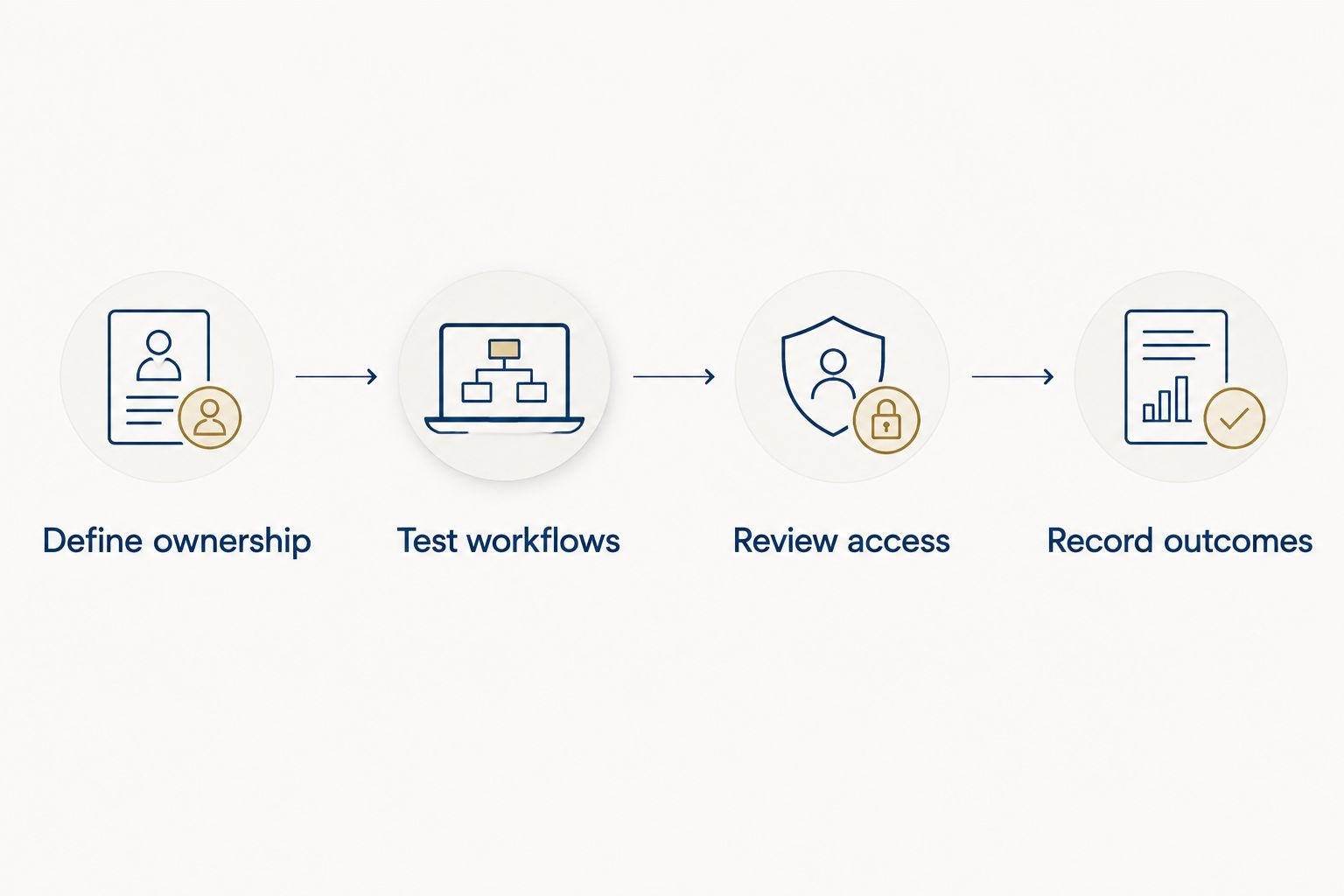
Follow this sequence and keep the results in a shared decision record:
- Define ownership: Assign responsibility for alerts, patches, scripts, remote access, and escalation.
- Test workflows: Complete patching, remote assistance, application maintenance, and a failed automation task.
- Review access: Check what routine technicians can do and which actions require additional permission.
- Record outcomes: Document completed work, unresolved failures, administrative effort, and remaining requirements.
Plan a follow-up review 60 days after deployment to check whether monitoring rules and maintenance ownership still match daily work. A successful pilot is a starting point; operating responsibilities must survive the rollout.
Which RMM software should you choose?
Start with NinjaOne if monitoring, patching, and remote support are your primary needs. Choose Atera when consolidating ticketing is central, ManageEngine Endpoint Central for broader administration, ConnectWise Automate for owned scripting workflows, or Microsoft Intune for policy-led management.
IT Core is best for businesses that need senior technology leadership and flexible delivery support alongside their internal IT team. Define the operational gap first, then select the platform that closes it without creating an unowned workload.
Plan your IT operating model
Define leadership, internal-team responsibilities, and delivery needs before choosing an endpoint platform.
FAQ
What's the best RMM software for IT teams in 2026?
NinjaOne is the default shortlist choice for internal IT teams prioritizing monitoring, patching, and remote support. Atera, ManageEngine Endpoint Central, ConnectWise Automate, and Microsoft Intune address different support and administration needs.
Is Atera better than NinjaOne for an internal IT department?
Atera is the better shortlist fit when ticketing and endpoint management must share one platform. NinjaOne is the default recommendation here when endpoint monitoring and remote support drive the decision.
Can Microsoft Intune replace RMM software?
Microsoft Intune can replace some endpoint-management work, but it is not a complete traditional RMM replacement. Assess monitoring, live troubleshooting, remote assistance, and automation separately from configuration and compliance policies.
What's the difference between RMM and endpoint management?
RMM centers on monitoring devices and performing remote operational work. Endpoint management has a broader policy and administration focus, including configuration, application deployment, and compliance, with overlap between the categories.
Does a small internal IT team need ticketing in its RMM platform?
A small internal IT team needs a clear ticket workflow, not necessarily ticketing inside the RMM platform. Keep an existing service desk when it already handles assignment, escalation, and resolution well.
How should an internal IT team test RMM software?
Test RMM software against real maintenance and support tasks on representative devices. Include patch failures, remote assistance, access permissions, and failed automation so the evaluation covers exceptions as well as successful actions.
Should an internal IT team use RMM and Intune together?
Use RMM and Intune together when they serve distinct, documented responsibilities. Assign ownership for policies, patching, applications, monitoring, and remote support to prevent conflicting actions.
One last thing
Before rollout, ask every technician where they will investigate a failed patch and who owns the next action. If the answers differ, fix the process before adding more automation.
The best RMM software is the platform your team can operate consistently. A documented handoff is more useful than another alert nobody owns.