

Best overall for protecting company laptops: Microsoft Defender for Business. Best for shared access problems: 1Password Business. Best for recovering computer files: Backblaze Business Backup. The best cybersecurity tools for small business in 2026 address different gaps; this guide helps you choose the next control your business actually needs.
- Microsoft Defender for Business is the best cybersecurity tool for small business endpoint protection, not a complete security plan.
- Choose 1Password Business when password sharing and account handoffs are the immediate problem.
- Choose Backblaze Business Backup when you need to recover files from a lost or damaged computer.
- IT Core Consulting Group helps small businesses choose and manage security tools alongside their internal IT teams.
Why this matters
A password manager cannot recover a deleted file. A backup cannot stop someone from signing in with a stolen account. Buying several tools without assigning someone to configure them leaves the same gaps in place.
The decision in 2026 is which gap to close first, and who will own the tool afterward. IT Core Consulting Group provides senior technology leadership and IT delivery that strengthens internal teams across security and co-managed IT, without a full-time executive. That is a service decision, not another product in the ranking.
What makes the best cybersecurity tools for small business?
Use these criteria before comparing vendors. The best choice is the one that addresses a known weakness your team can manage, not the one with the longest feature list.
- Coverage: Identify what the tool protects: devices, accounts, passwords, files or access to applications. Do not treat those as interchangeable.
- Admin effort: Name the person who will approve changes, review alerts and remove access when staff leave. An unowned dashboard is not a security process.
- Recovery: Check whether you can restore what matters, not merely whether a backup job reports success.
- Identity: Decide how staff sign in, whether accounts are shared and how access ends when a role changes.
- Fit with existing systems: Check what your business already uses before adding a second tool that solves the same problem.
These criteria separate product selection from deployment. In 2026, a sensible purchase still needs a device list, an account owner and a way to verify that the chosen control works.
At a glance: which tool fits your gap?
| Tool | Best for | Standout function | Key limitation |
|---|---|---|---|
| Microsoft Defender for Business | Company laptops and desktops | Endpoint threat protection | Does not replace backups or account management |
| 1Password Business | Password sharing and handoffs | Managed password vaults | Staff must change how they store and share credentials |
| Microsoft Entra ID | Staff sign-ins and access | Centralized identity management | Requires careful account and permission setup |
| Backblaze Business Backup | Computer file recovery | Backup of supported computer files | Does not cover every system or cloud application |
| Cloudflare Zero Trust | Access to internal applications | Access rules for protected applications | Requires application-by-application planning |
The table is a decision tree, not a claim that every small business needs all five tools. Start with the row that matches the gap you can describe and verify.
1. Microsoft Defender for Business: best for company devices
Microsoft Defender for Business protects business endpoints such as laptops and desktops. It gives an IT owner a place to manage endpoint protection and investigate device threats. For a small business with company-managed computers but no clear endpoint owner, it is the most useful starting point in this ranking.
Microsoft Defender for Business pros:
- Focuses on devices where staff do their daily work.
- Gives an administrator a defined place to review endpoint security activity.
- Fits a business that already manages its devices through Microsoft services.
Microsoft Defender for Business cons:
- Does not replace file backups, password management or access reviews.
- Requires deployment and alert ownership; installing it is not the final step.
- Is a weaker first purchase if unmanaged accounts, rather than devices, are your clearest gap.
Best for: Businesses that can identify their company devices and assign an IT owner to endpoint protection.
Verdict: Buy when device protection is the immediate gap. In 2026, confirm which computers are covered before adding another endpoint product.
2. 1Password Business: best for password handoffs
1Password Business is a password manager for organizations. Staff can store credentials in managed vaults rather than passing them through email or keeping them in personal notes. It is the clearest choice here when shared logins and departing-employee handoffs cause confusion.
1Password Business pros:
- Gives teams a defined place to store and share work credentials.
- Makes access handoffs easier to organize than scattered password lists.
- Addresses a specific problem without pretending to protect devices or files.
1Password Business cons:
- Staff must adopt the new process; an unused vault solves nothing.
- Vault access still needs an owner and regular review.
- Does not replace individual accounts where an application supports them.
Best for: Teams that rely on shared credentials and need a controlled handoff process.
Verdict: Buy when password storage is visibly inconsistent. Start by moving 1 shared credential into an approved vault, then document who should retain access. That small test exposes permission questions before a wider rollout.
3. Microsoft Entra ID: best for staff sign-ins
Microsoft Entra ID manages identities and access to connected applications. Its job is to help an organization decide who can sign in and how that access is governed. Choose it when account creation, role changes and departures are harder to track than endpoint alerts.
Microsoft Entra ID pros:
- Centers the decision on named user accounts and their access.
- Supports a more consistent process for onboarding and offboarding.
- Connects identity administration to applications that support it.
Microsoft Entra ID cons:
- Poorly assigned permissions remain a problem even with a central system.
- Application coverage depends on what you use and how it is configured.
- Does not recover files or replace endpoint protection.
Best for: Businesses that need clearer ownership of employee accounts and application access.
Verdict: Buy when you cannot quickly identify who owns access to a critical application. Before changing policies in 2026, select 1 employee account and trace its access from approval through removal. Fix the handoff, not just the sign-in screen.
4. Backblaze Business Backup: best for computer files
Backblaze Business Backup is a computer backup service. It addresses a different question from endpoint protection: if a computer or its local files are lost, what can the business recover? That makes it a distinct pick for teams whose important work still lives on staff computers.
Backblaze Business Backup pros:
- Focuses on recoverability rather than threat alerts.
- Gives computer file protection a clear owner and testable purpose.
- Pairs with, rather than duplicates, endpoint and identity controls.
Backblaze Business Backup cons:
- Does not automatically protect every application or storage location your business uses.
- A completed backup is not proof that the right file can be restored.
- Does not stop unauthorized access to an account.
Best for: Businesses that need a defined recovery path for files on supported computers.
Verdict: Buy when important computer files have no tested recovery path. Restore 1 file to a safe location and check that it opens; do not use a backup status indicator as your only evidence.
5. Cloudflare Zero Trust: best for internal application access
Cloudflare Zero Trust provides tools for controlling access to protected applications. It is a fit when staff need access to internal resources and the business wants explicit rules for who can reach them. It is not the first fix for a team that has not yet organized its accounts.
Cloudflare Zero Trust pros:
- Makes access to protected applications a deliberate policy decision.
- Gives IT teams a way to review who needs access to each protected resource.
- Fits a project with a clearly identified internal application and owner.
Cloudflare Zero Trust cons:
- Each application needs planning and configuration.
- Access rules depend on accurate identities and current staff roles.
- Does not replace backups, password management or endpoint protection.
Best for: Teams with defined internal applications and an IT owner who can maintain access rules.
Verdict: Hold until you can name the application, its users and its owner. In 2026, that inventory is more useful than adding an access layer nobody is assigned to maintain.
Start with the gap, not the vendor
A useful security plan starts with a small inventory. List devices, map accounts, test recovery and assign ownership before expanding the toolset. Each step answers a question a product comparison cannot answer for you.
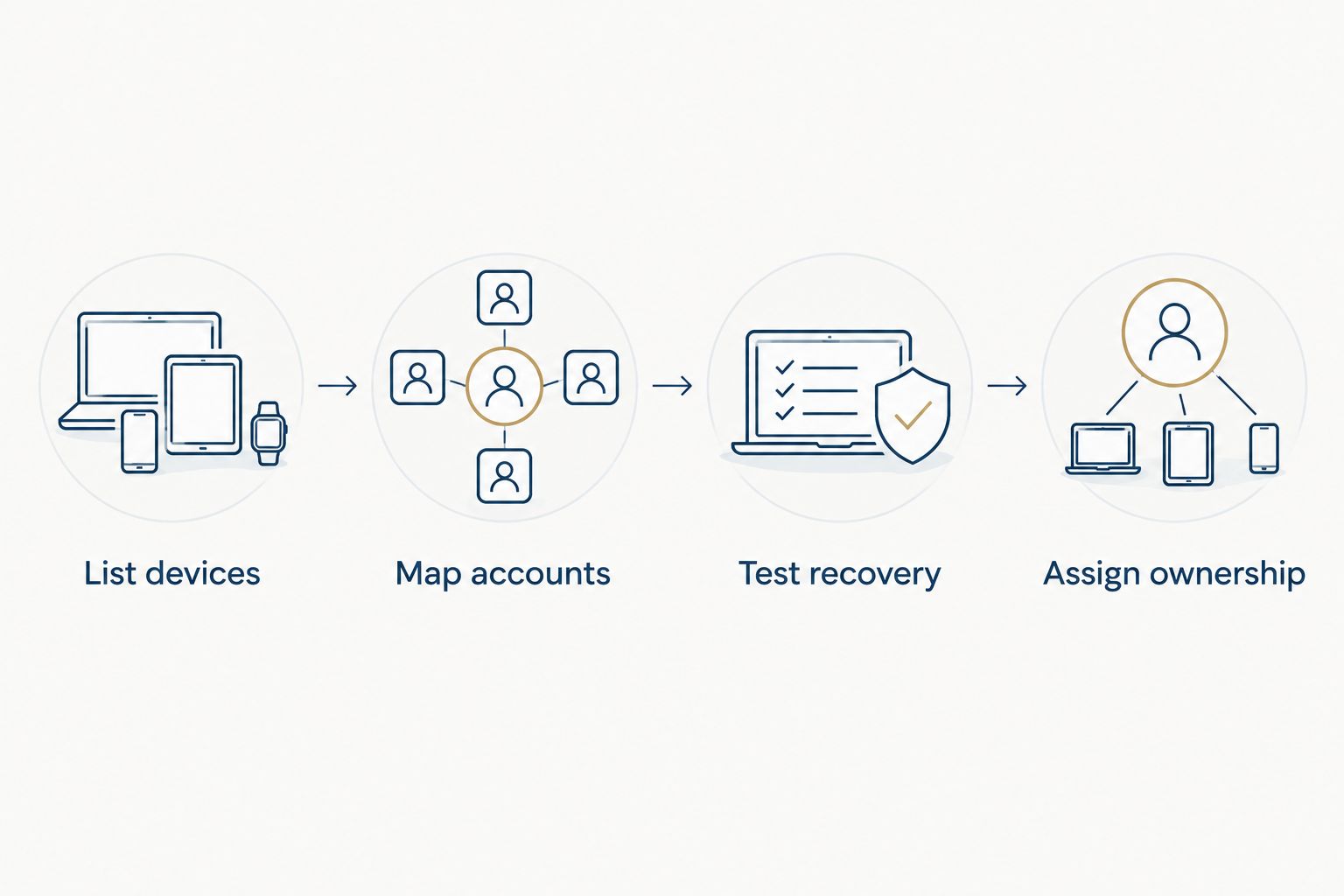
- List devices: Pick 1 company laptop and verify who manages it, which endpoint protection it uses and who responds to an alert. Repeat the check across the remaining devices.
- Map accounts: Pick 1 important application and identify its account owner, current users and departure process. If the answers differ between staff, fix the process before adding access rules.
- Test recovery: Pick 1 business file, restore a separate copy and confirm it opens. Then identify other file locations that the same backup does not cover.
- Assign ownership: Give each selected tool a person responsible for setup, access changes and routine review. Record what that person should do when they are unavailable.
This sequence also helps an internal IT team ask for focused support. IT Core Consulting Group provides flexible security and co-managed IT support that strengthens internal teams; the practical brief is the gap, the current owner and the decision that needs senior attention.
How we ranked these tools
The ranking puts endpoint protection first because the question is about tools for a typical set of company computers. The remaining order follows distinct decisions: credentials, identities, computer files and internal application access. It is not a universal purchase order; the right first move changes when your known gap is account access or recovery.
Each pick has a job the others do not fully perform, plus an operational limitation. That matters more than comparing feature counts across products built for different tasks. In 2026, check your existing services before buying: adding a product you already have will not establish who configures it or responds when it reports a problem.
Which cybersecurity tool should you choose?
Choose Microsoft Defender for Business by default if company-device protection is the unanswered question. Choose 1Password Business instead if staff share work passwords informally. Choose Microsoft Entra ID when account access lacks clear ownership, and Backblaze Business Backup when computer files lack a tested recovery path. Wait on Cloudflare Zero Trust until you have a defined internal application and access owner.
The best cybersecurity tools for small business in 2026 are the ones assigned to specific gaps and accountable people. IT Core Consulting Group fits a different decision: bringing senior technology leadership to the selection and delivery work when an internal team needs support rather than another unowned subscription.
FAQ
What is the best cybersecurity tool for a small business in 2026?
Microsoft Defender for Business is the best starting pick when company-device protection is the gap. If passwords, account access or file recovery are the immediate problem, choose the tool built for that job instead.
Is a password manager enough for small-business security?
No. 1Password Business helps manage work credentials, but it does not replace endpoint protection, account administration or file backups.
Is Microsoft Defender for Business better than Microsoft Entra ID?
Neither replaces the other. Microsoft Defender for Business focuses on endpoints, while Microsoft Entra ID manages identities and access; choose according to the gap you need to close.
Do small businesses need both endpoint protection and backups?
Yes, when they need both device protection and a way to recover computer files. Microsoft Defender for Business and Backblaze Business Backup address different tasks, so verify the coverage of each.
What should I check before choosing a backup tool?
Check which file locations it covers and whether you can restore a needed file. A backup status alone does not show that every application or storage location is protected.
When does Cloudflare Zero Trust make sense for a small business?
Cloudflare Zero Trust makes sense when you can name the internal applications to protect, their users and the person who owns access rules. Organize accounts first if those details are unclear.
Who should manage cybersecurity tools in a small business?
Assign a named internal owner for setup, access changes, alerts and recovery checks. IT Core Consulting Group can strengthen an internal IT team with security and senior technology leadership when that team needs support.
One last thing
Before adding a second tool in 2026, ask the owner of the first one to show you 1 working check: a protected laptop, a properly controlled account or a restored file. A clear demonstration tells you more about your next move than another product shortlist.