

Best overall starting point: your cloud provider’s native billing tool. For the best cloud cost management tools in 2026, choose AWS Cost Explorer for AWS analysis, Microsoft Cost Management for Azure, Google Cloud Billing for billing-data analysis, Kubecost for Kubernetes allocation, and IBM Cloudability for multi-cloud financial management.
- The best cloud cost management tools start with AWS Cost Explorer, Microsoft Cost Management, or Google Cloud Billing.
- Kubecost is best for assigning Kubernetes costs to workloads and teams.
- IBM Cloudability is best for multi-cloud financial management across business owners.
- IT Core helps growing businesses connect cloud decisions with senior technology leadership.
Why this matters
A cloud bill tells you what you spent. It does not automatically tell you which customer, application, or business decision caused the expense. Your tool should connect those two views before you act on an optimization recommendation.
Choose the reporting gap before choosing the software. If you need senior leadership alongside your internal team, IT Core provides IT consulting and cloud support for growing businesses without a full-time executive.
For your 2026 shortlist, separate visibility from action. A dashboard can reveal a change in spending; someone still needs to establish whether the change is expected, assign an owner, and approve the response.
What makes the best cloud cost management tools
These criteria matter more than the number of charts on a product page:
- Billing coverage: The tool must cover the cloud accounts and services you actually use. A single-provider view is useful until your decisions span providers.
- Cost allocation: You need to assign expenses to applications, teams, or business units. Unassigned spending makes accountability difficult.
- Decision support: Reports should help you distinguish growth, waste, and necessary capacity. A lower bill is not automatically a better business outcome.
- Workflow fit: Finance needs explanations; engineers need resource-level context. Choose a tool that supports the people responsible for each decision.
- Operational effort: Account connections, tags, allocation rules, and reporting need maintenance. Include that work in your selection.
- Data access: Exports and detailed billing records matter when you need custom analysis or reconciliation outside the tool.
A sensible evaluation starts with a 30-day billing baseline, followed by a 60-day review of ownership and allocation, then a 90-day check of completed actions. These are recommended review windows, not promised implementation times or savings targets.
Cloud cost management tools at a glance
The order below follows the buying decision: start with your provider, add workload detail where needed, then consider a cross-cloud management layer.
| Tool | Best for | Standout capability | Key limitation |
|---|---|---|---|
| AWS Cost Explorer | AWS spending analysis | Filtering, grouping, and forecasting AWS costs | Does not provide a unified view across cloud providers |
| Microsoft Cost Management | Azure financial oversight | Cost analysis and budgets within Azure scopes | Broader reporting needs depend on your environment and integrations |
| Google Cloud Billing | Custom billing-data analysis | Billing reports and exports to BigQuery | Detailed analysis requires query skills and maintained reporting |
| Kubecost | Kubernetes workload allocation | Cost visibility by Kubernetes workload and organizational grouping | Does not replace a complete cloud billing view |
| IBM Cloudability | Multi-cloud financial management | Cross-cloud cost reporting and allocation | Requires onboarding and agreement on allocation rules |
1. AWS Cost Explorer: best cloud cost management tool for AWS analysis
AWS Cost Explorer helps you examine AWS costs and usage through filters, groupings, and time-based reports. It also provides forecasting so you can compare expected spending with the direction of your current usage. Start here when your immediate question is what changed inside AWS.
The practical advantage is proximity to the billing data. Your team can investigate account, service, and tag-based spending without first designing a separate reporting system. That makes it a useful starting point for an AWS-focused business.
AWS Cost Explorer pros:
- Groups costs by dimensions such as account, service, and activated cost allocation tags.
- Supports time-based comparisons for investigating spending changes.
- Includes forecasts for planning discussions.
- Keeps AWS cost investigation within the AWS environment.
AWS Cost Explorer cons:
- Does not combine AWS, Azure, and Google Cloud spending into one financial view.
- Depends on useful account structure and tagging for business-level allocation.
- Does not turn a spending finding into an approved engineering change.
Best for: An AWS-focused team that needs to explain its bill before adding another platform.
For a 2026 evaluation, ask an engineer and a finance owner to explain the same spending increase using the available reports. If they cannot connect it to a workload and owner, fix allocation before expanding your dashboard collection.
Verdict: Buy into the native-first approach; use AWS Cost Explorer before adding another AWS reporting layer.
2. Microsoft Cost Management: best cloud cost management tool for Azure oversight
Microsoft Cost Management provides cost analysis and budgeting capabilities within Azure. You can examine spending at relevant Azure scopes and organize views around the subscriptions, resource groups, and other structures your business uses.
Its strongest fit is an organization already managing cloud resources through Azure. The useful question is not whether another tool has more charts. It is whether your existing Azure structure gives finance and IT a clear explanation of spending.
Microsoft Cost Management pros:
- Supports cost analysis within the Azure management environment.
- Provides budgets and alerts for tracking spending against expectations.
- Uses Azure scopes to organize financial oversight.
- Supports tagged cost analysis when resources carry useful tags.
Microsoft Cost Management cons:
- A resource group does not automatically correspond to a business owner.
- Budget notifications still need an assigned response process.
- Cross-provider requirements need a separate coverage assessment.
Best for: An Azure-centered business that wants finance and internal IT to work from the same cost structure.
Ask your team to identify who owns each subscription and how shared resources are assigned. Then test whether a budget notification reaches someone authorized to investigate it. A notification without an owner adds noise rather than control.
Verdict: Buy into Microsoft Cost Management when Azure is the center of your cloud operations.
3. Google Cloud Billing: best cloud cost management tool for custom analysis
Google Cloud Billing provides billing reports and supports billing-data exports to BigQuery. That combination suits teams that need standard spending visibility plus the ability to build their own financial analysis.
The export matters when your questions extend beyond a standard chart. You can analyze billing records alongside business data, provided your team manages the queries and understands how the datasets relate. This is a reporting foundation, not a substitute for ownership rules.
Google Cloud Billing pros:
- Provides native reports for reviewing Google Cloud spending.
- Supports billing exports to BigQuery for custom analysis.
- Includes budgets and notifications for spending oversight.
- Supports project-based views that fit Google Cloud organization structures.
Google Cloud Billing cons:
- Custom reporting requires query skills and ongoing maintenance.
- Project-level spending does not automatically explain shared business costs.
- A billing export alone does not create a decision workflow.
Best for: A Google Cloud team with analytical skills and business questions that need custom reporting.
For your 2026 review, write down the question before requesting a dashboard. For example, ask whether an application’s spending increased because usage grew or because its infrastructure changed. That distinction makes the analysis actionable.
Verdict: Buy into Google Cloud Billing when native reports and BigQuery analysis match your team’s capabilities.
4. Kubecost: best cloud cost management tool for Kubernetes allocation
Kubecost focuses on Kubernetes cost visibility and allocation. It helps you examine costs through workload-related dimensions such as namespaces and labels, giving teams a view that a provider-level bill does not supply on its own.
This distinction matters when several applications share a cluster. A cloud bill can show infrastructure spending while leaving application ownership unresolved. Kubecost adds workload context, but you still need rules for idle capacity and shared resources.
Kubecost pros:
- Connects Kubernetes resource costs with workloads.
- Supports allocation using namespaces and labels.
- Gives engineering teams context for investigating cluster spending.
- Helps distinguish application costs within shared infrastructure.
Kubecost cons:
- Kubernetes allocation depends on consistent labels and ownership practices.
- Shared and idle costs require explicit allocation decisions.
- Workload reporting does not replace your provider’s complete billing records.
Best for: An engineering organization that needs to assign shared Kubernetes spending to applications or teams.
Before adopting Kubecost, decide who pays for capacity that is present but unused. Otherwise, your teams can agree on the dashboard and still disagree on the bill. Establish that rule with finance and engineering together.
Verdict: Buy Kubecost when Kubernetes allocation is the specific gap; skip it for a purely account-level billing problem.
5. IBM Cloudability: best cloud cost management tool for multi-cloud oversight
IBM Cloudability provides cloud financial management capabilities across providers, including cost reporting, allocation, budgeting, and optimization analysis. Its role is to give organizations a common financial view when separate provider reports no longer support the way they manage spending.
The important difference is organizational scope. A cross-cloud platform serves teams that need shared definitions and repeatable financial workflows, not simply another view of an individual cloud account.
IBM Cloudability pros:
- Brings supported cloud-provider spending into a shared reporting environment.
- Supports business-oriented cost allocation.
- Provides budgeting and optimization capabilities for financial management.
- Fits a recurring process involving finance, engineering, and business owners.
IBM Cloudability cons:
- Requires account onboarding and ongoing configuration.
- Depends on agreed allocation rules and usable source data.
- Adds another platform for your organization to administer.
Best for: A multi-cloud organization whose financial decisions span providers and departments.
For a 2026 shortlist, require a demonstration using your allocation questions. Ask how the platform handles shared services, unassigned spending, and reports for business owners. A polished overview is less useful than a clear answer to those questions.
Verdict: Buy IBM Cloudability when cross-cloud financial coordination justifies a separate management platform; wait if native reports answer your questions.
How the tools are ranked
This ranking prioritizes billing coverage, allocation, decision support, workflow fit, operational effort, and data access. It is a use-case comparison, not a claim that one product produces greater savings than another.
Native tools come first because they address the initial provider-specific investigation. Kubecost earns a separate place for Kubernetes allocation. IBM Cloudability fits the broader requirement for cross-cloud financial coordination.
Put the tool into a working review process
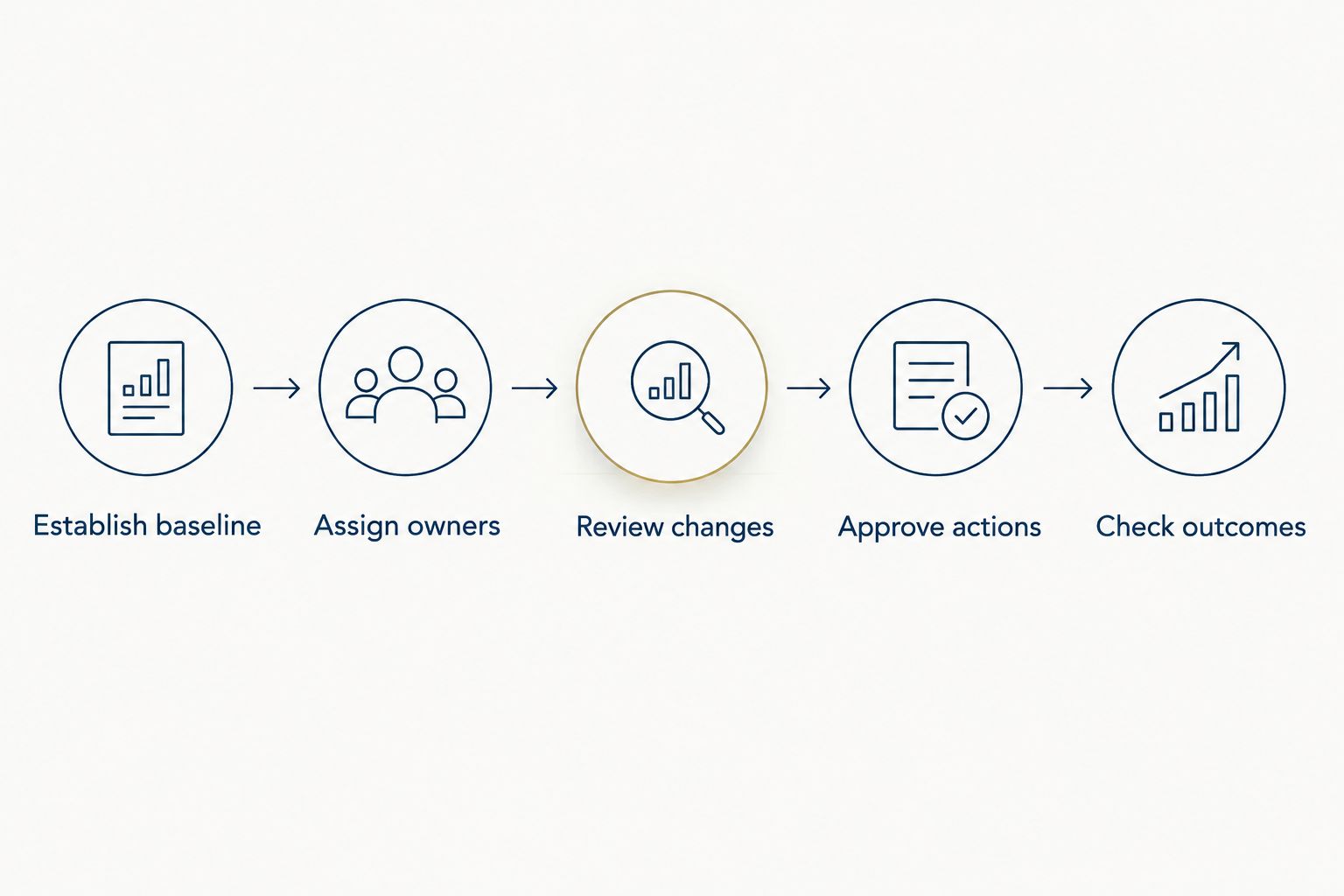
A cloud cost management tool needs a repeatable route from a finding to a decision. Use this sequence to evaluate whether the software fits your business.
Establish baseline
Choose a 30-day billing period and reconcile the report with the provider bill. Document credits, adjustments, and allocation choices so later comparisons use the same basis.
Assign owners
Give applications, accounts, and shared services named business and technical owners. Leave unassigned costs visible rather than distributing them without agreement.
Review changes
At the 60-day review, separate expected growth from unexplained changes. Ask the technical owner for context before treating increased spending as waste.
Approve actions
Record the proposed change, its owner, and its service implications. Resizing a resource or changing retention requires an operational decision, not just a financial preference.
Check outcomes
At the 90-day check, compare completed changes with subsequent billing and service behavior. Keep a record of what changed so your next review does not start from memory.
IT Core cloud consulting is best for growing businesses that need senior technology leadership alongside their internal teams. Use that support to connect financial priorities with cloud delivery responsibilities, rather than treating the software purchase as the whole solution.
Discuss your cloud priorities
Connect cloud reporting decisions with senior technology leadership and support for your internal team.
Which cloud cost management tool should you choose?
Start with the native tool for your primary provider. Choose AWS Cost Explorer, Microsoft Cost Management, or Google Cloud Billing when your main need is understanding spending within that environment.
Choose Kubecost when shared Kubernetes workloads obscure ownership. Choose IBM Cloudability when separate provider reports prevent finance and engineering from managing costs together. For 2026, the right default is the tool that answers your current decision without adding an unnecessary reporting layer.
FAQ
What's the best cloud cost management tool for a small business?
Your primary cloud provider’s native billing tool is the best starting point for a small business. Use AWS Cost Explorer, Microsoft Cost Management, or Google Cloud Billing to establish visibility before considering another platform.
Is AWS Cost Explorer better than IBM Cloudability?
AWS Cost Explorer is the better fit for AWS-specific spending analysis; IBM Cloudability fits multi-cloud financial management. Choose according to the scope of your reporting and allocation needs.
Do I need Kubecost if I already use cloud billing reports?
You need Kubecost when Kubernetes workload allocation is a gap in your existing reports. Provider billing shows infrastructure charges, while Kubernetes allocation connects costs with workloads and teams.
Can cloud cost management tools automatically reduce my bill?
Cloud cost management tools do not guarantee a lower bill. Reports and recommendations still require owners to review service requirements, approve changes, and check the results.
What should I check before choosing a cloud cost management platform?
Check billing coverage, allocation, decision support, workflow fit, operational effort, and data access. Ask each vendor to demonstrate your actual reporting questions rather than a generic dashboard.
How should I compare cloud cost management tool pricing?
Compare current vendor terms against your account scope, reporting requirements, and administration needs. Confirm what the proposed agreement includes and who will maintain the configuration.
Can IT Core help without replacing my internal IT team?
IT Core provides senior technology leadership and flexible IT delivery that strengthens internal teams. Its services include cloud support for growing businesses without a full-time executive.
One last thing
Keep unassigned spending visible. Distributing every expense makes a report look complete, but it can hide the ownership problem you need to solve.
Before your next review, identify the shared cost that causes the most disagreement and write down its allocation rule. That single decision gives your chosen tool a clearer job.