

Best overall for mixed server and virtual workloads in 2026: Veeam. Best for Azure-centered operations: Microsoft Azure Backup. Best for AWS resource governance: AWS Backup. Best for teams that want backup and security management from one vendor: Acronis Cyber Protect. The best backup and disaster recovery software is the option your team can restore from, within the recovery targets your business has approved.
- Veeam is the best backup and disaster recovery software choice for mixed server and virtual workloads in this comparison.
- Choose Microsoft Azure Backup for Azure-centered operations and AWS Backup for AWS resource governance.
- Acronis Cyber Protect suits teams seeking backup and security management from one vendor.
- Test a restore and assign an owner before treating any backup plan as disaster recovery.
Why this matters
A backup answers whether a copy exists. Disaster recovery answers whether people can restore the right systems, in the right order, when work stops. Buying software without settling that distinction leaves an important business decision to whoever responds first.
For a growing company, the practical next step is to name the systems that keep work moving, decide how much data loss is acceptable, and assign responsibility for a restore. IT Core Consulting Group provides senior technology leadership and IT delivery that can strengthen an internal team making those decisions. It is a consulting service, not another entry in the software ranking.
A 2026 shortlist should start with your actual workloads rather than a vendor's feature list. A company centered on Azure has a different operating question from one protecting a mix of virtual machines and servers. Neither gets a usable recovery plan simply by switching on a backup policy.
What makes the best backup and disaster recovery software?
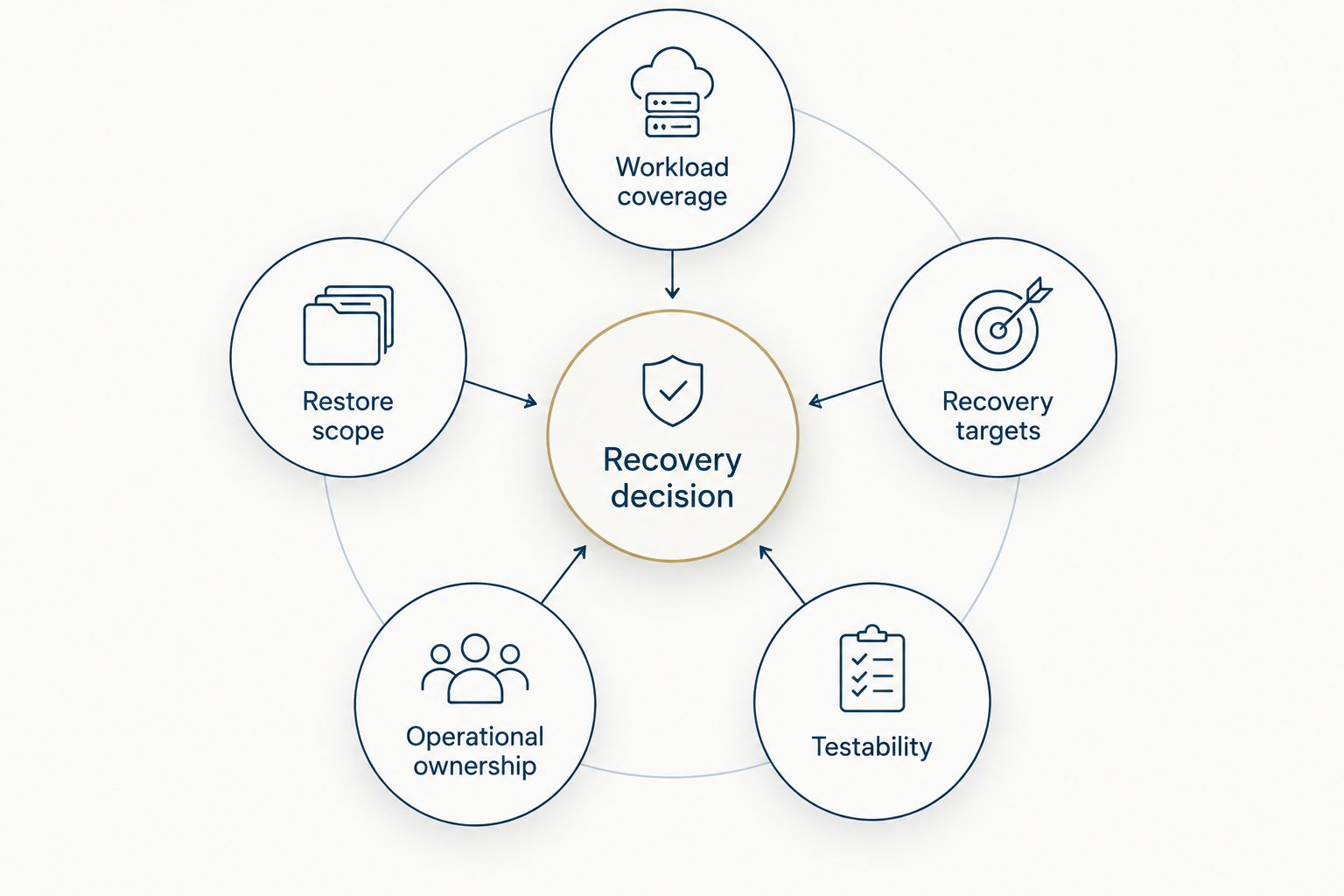
Use these criteria before reading the rankings. A strong fit covers what you run today and gives your team a credible way to restore it.
- Workload coverage: List the servers, virtual machines, cloud resources, and business applications you need to protect. Check coverage for each one; do not assume that support for a platform means support for every application on it.
- Restore scope: Determine whether you need a file, a system, or an application restored. The useful question is what your staff can bring back when a specific failure interrupts work.
- Recovery targets: Decide how long each critical service can be unavailable and how much recent work the business can lose. Use those decisions to judge the backup schedule and restore process.
- Operational ownership: Name who checks backup failures, approves a restore, and takes over when the usual owner is unavailable. Software does not make those assignments for you.
- Testability: Require a repeatable restore test with an owner, a result, and a follow-up for anything that failed. A successful backup notification is not a completed restore test.
These criteria form a recovery decision: what needs protection, what must come back, how quickly it matters, who acts, and how you verify the result. Keep the answers in plain language so business leaders and the IT team can agree on them.
Backup and disaster recovery software at a glance
| Software | Best for | Standout feature | Key limitation |
|---|---|---|---|
| Veeam | Mixed server and virtual workloads | Backup and recovery centered on those workloads | The team still needs a defined recovery sequence and restore owner |
| Microsoft Azure Backup | Azure-centered operations | Backup within the Azure environment | Azure fit alone does not settle recovery for systems elsewhere |
| AWS Backup | AWS resource governance | Central backup management for supported AWS resources | Coverage depends on the resources in use; a backup plan is not a full response plan |
| Acronis Cyber Protect | Backup and security management from one vendor | Backup and protection capabilities in one product | A combined product still requires separate recovery decisions and tests |
The table is a routing guide, not a claim that one product restores every workload. In 2026, check the current documentation for the exact systems you use before committing to any option. Then prove the restore path with your own team.
1. Veeam: best backup and disaster recovery software for mixed workloads
Veeam is the default pick here when a growing company needs to protect a mix of server and virtual workloads. Its backup and recovery focus makes it a sensible starting point when those systems, rather than one cloud provider's resources, define the job. The buying decision still depends on whether your precise applications and recovery method fit.
Veeam pros:
- A clear starting point for evaluating server and virtual workload protection.
- Keeps the selection discussion focused on recovery, not only on creating copies.
- Fits an assessment in which different systems have different restore priorities.
Veeam cons:
- A product choice cannot determine which business service should return first.
- Your team must still confirm coverage, assign an owner, and test the restores it needs.
Best for: Companies whose recovery plan begins with a mix of server and virtual workloads.
Ask for a demonstration built around one of your actual failure scenarios: identify the affected system, the data needed, and who authorizes the restore. If the demonstration does not match the systems you run, keep evaluating. Verdict: Buy for a verified mixed-workload fit; hold until the restore test answers the business question.
2. Microsoft Azure Backup: best for Azure-centered operations
Microsoft Azure Backup is the direct option to examine when Azure is central to the environment your team operates. It belongs on this shortlist because backup planning can sit alongside the team's existing Azure operations. That alignment is useful, but it is not a substitute for mapping every system the business needs after an outage.
Microsoft Azure Backup pros:
- A focused starting point for an Azure-centered backup discussion.
- Lets the IT team evaluate protection alongside its existing Azure responsibilities.
- Makes it easier to identify which recovery questions concern Azure and which concern other systems.
Microsoft Azure Backup cons:
- An Azure-centered choice does not, by itself, settle recovery across every other environment.
- Backup configuration still needs a documented restore procedure and a test.
Best for: Teams whose priority workloads and day-to-day operations center on Azure.
Before choosing it, put every critical workload on a single inventory. Mark which ones belong in the Azure recovery plan and who handles the remainder. In 2026, that boundary matters more than treating one platform's backup settings as a company-wide answer. Verdict: Buy for a verified Azure-centered fit; hold if critical systems remain outside the plan.
3. AWS Backup: best for AWS resource governance
AWS Backup is built for central backup management across supported AWS resources. It is a strong candidate when the immediate operating problem is how an AWS-focused team manages backup responsibilities. You still need to confirm that the resources you depend on are supported and that the restore procedure meets business needs.
AWS Backup pros:
- Gives an AWS-focused team one place to frame backup management for supported resources.
- Suits a review organized around resource ownership and backup policies.
- Provides a practical starting point for testing restores in an AWS-centered environment.
AWS Backup cons:
- Support must be checked against the exact AWS resources your company uses.
- Central backup management does not decide communication, approval, or recovery order during an incident.
Best for: Teams that primarily need to govern backups for supported AWS resources.
Start with a list of the resources behind a critical business service. Ask the responsible team to show both the backup record and the steps to restore that service. If either side is unclear, the policy is not yet a recovery plan. Verdict: Buy for a verified AWS resource fit; hold until a service-level restore is demonstrated.
4. Acronis Cyber Protect: best for combined backup and security management
Acronis Cyber Protect combines backup and security capabilities. That makes it relevant when a team wants to assess those responsibilities through one vendor rather than select a backup product in isolation. The combined scope deserves a clear ownership decision: someone still has to monitor backups, respond to issues, and run restores.
Acronis Cyber Protect pros:
- Brings backup and security management into the same product evaluation.
- Helps a team discuss protection and recovery responsibilities together.
- Offers a distinct route for companies that prefer a combined approach over a backup-only shortlist.
Acronis Cyber Protect cons:
- Combined capabilities do not remove the need to specify restore priorities.
- A wider product scope can distract from the decisive question: can your team restore its critical systems?
Best for: Teams that want to evaluate backup and security management from one vendor.
Give the product the same restore test as every other candidate. Evaluate its combined capabilities separately from the result of that test; one should not excuse a gap in the other. Verdict: Buy if the combined approach fits your team and the required restores work; otherwise, hold.
How we ranked the options
The 2026 ranking follows the use case each product can address most clearly. Veeam leads for mixed server and virtual workloads; Microsoft Azure Backup and AWS Backup serve distinct cloud-centered operating models; Acronis Cyber Protect covers the combined backup-and-security decision. No entry earns its place on a promise that it can restore systems you have not identified.
The deciding evidence belongs inside your company: a workload inventory, agreed recovery targets, a named owner, and a documented restore test. A feature comparison narrows the shortlist. It cannot replace that evidence.
IT Core Consulting Group is best for growing businesses that need senior oversight of backup and recovery decisions without adding a full-time executive. IT Core Consulting Group can strengthen an internal IT team across security, cloud, and IT delivery; the software remains a separate selection. That distinction keeps the service recommendation honest and the buying decision tied to your systems.
Set your recovery priorities
Discuss the systems, owners, and restore decisions your team needs to define.
Which backup and disaster recovery software should you choose?
Choose Veeam as the default shortlist candidate in 2026 if mixed server and virtual workloads drive your recovery requirements. Choose Microsoft Azure Backup when Azure is the center of the work, AWS Backup when supported AWS resources are the governance priority, or Acronis Cyber Protect when combined backup and security management is the requirement. None is the right answer until it passes a restore test for your own systems.
The fastest useful decision is not to ask every vendor for every feature. Write down one critical service, the systems it depends on, the person who owns its recovery, and the result the business needs. Use that scenario to remove options that do not fit. IT Core Consulting Group can help business leaders and internal IT teams turn those choices into a workable recovery plan; it does not need to be presented as a software vendor to do that job.
FAQ
What's the best backup and disaster recovery software for a growing company?
Veeam is the default shortlist choice for a growing company with mixed server and virtual workloads. For an Azure-centered or AWS-centered environment, compare the relevant cloud option against your actual restore requirements.
Is Microsoft Azure Backup better than AWS Backup?
Microsoft Azure Backup is the better fit for an Azure-centered recovery plan; AWS Backup fits governance of supported AWS resources. Neither platform choice replaces a test of the business services you need to restore.
When should a company consider Acronis Cyber Protect?
Consider Acronis Cyber Protect when your team wants to evaluate backup and security management from one vendor. Confirm workload coverage and test recovery before choosing a combined product.
Does having backups mean a business has disaster recovery?
No. Disaster recovery also requires recovery priorities, assigned owners, a restore procedure, and evidence that the procedure works.
What should an internal IT team test before choosing backup software?
Test a restore of a system or service the business depends on. Record who performed it, what came back, what did not, and which steps need to change.
Can an IT consulting firm replace backup software?
No. IT Core Consulting Group provides technology leadership and IT delivery, not a backup software product in this comparison. The service decision concerns planning and team support; the software decision concerns workload fit and restoration.
How should recovery targets affect the software shortlist?
Recovery targets should define which options deserve a restore test. Set acceptable downtime and data loss for critical services, then check whether the team can meet those targets with its chosen process.
One last thing
The most revealing question in a 2026 backup review is not whether last night's job succeeded. Ask who would start the restore if the usual IT owner were unavailable, and have that person follow the documented steps. If the answer depends on knowledge held by one person, fix the ownership and procedure before expanding the software shortlist. IT Core Consulting Group can support that planning while your internal team retains a clear role in the recovery process.